Tax time does not have to be stressful. If you are an Australian content creator preparing your 2025-26 tax return, the key is having everything organised before you sit down to lodge. This checklist walks you through every document, record, and piece of information you need to gather so nothing gets missed and you claim every deduction you are entitled to.
Your Complete 2025-26 Tax Return Checklist
Work through each item below before lodging your return. The more prepared you are, the faster the process and the better your outcome.
1. Platform Income Statements and Earnings Reports
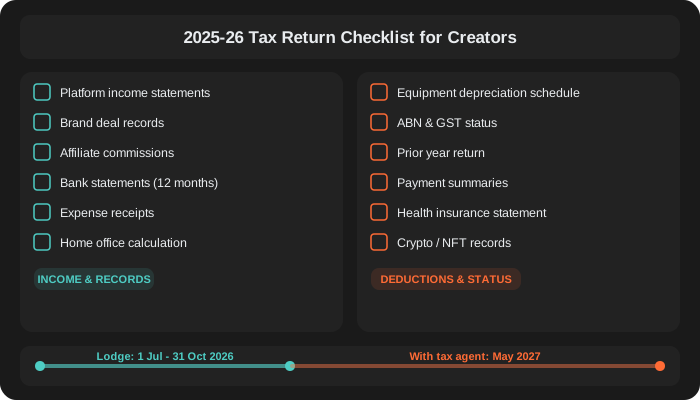
Download your annual earnings reports from every platform you earned income through during the 2025-26 financial year (1 July 2025 to 30 June 2026). This includes YouTube AdSense, TikTok Creator Fund, Instagram (if paid through Meta), OnlyFans, Twitch, Kick, Patreon, Substack, and any other platform that paid you. Log into each platform's dashboard and export your payment history or annual summary. Do not rely on memory or rough estimates.
2. Brand Deal and Sponsorship Records
Compile a complete list of every brand deal, sponsorship, and paid collaboration you completed during the year. For each deal, gather the contract or agreement, the invoice you issued, and the corresponding bank deposit. If you received gifted products in exchange for content, record the item and its estimated retail value, as this counts as barter income and must be declared.
3. Affiliate Commission Statements
Pull your earnings reports from all affiliate programs and networks, including Amazon Associates, LTK (formerly RewardStyle), ShareASale, Commission Factory, Impact, and any direct affiliate programs with brands. These payments are often small and spread across many sources, which makes them easy to miss. Check your email for payment notifications if a platform does not offer a consolidated report.
4. Bank Statements
Download twelve months of bank statements for every account that received business income or was used for business expenses. This includes your main business account, any PayPal or Stripe accounts, and personal accounts if you received creator income into them. Your bank statements serve as the backbone of your tax records and help your accountant cross-reference income and expenses.
5. Expense Receipts and Invoices
Gather receipts for every business expense you plan to claim as a deduction. Common creator expenses include camera and video equipment, lighting, microphones, tripods, editing software subscriptions, phone and internet bills, props and styling items, travel costs, and professional services like accountants and managers. Digital receipts are fine. The ATO requires you to keep records for five years from the date you lodge, so store them securely.
6. Home Office Calculation
If you work from home, whether filming, editing, or managing your business, you can claim home office deductions. To do this, you need to know the floor area of your dedicated workspace as a percentage of your total home, and the number of hours you worked from home during the year. You also need copies of your electricity bills, internet bills, and rent or mortgage interest statements. The ATO offers several methods for calculating home office deductions, and your accountant can help you choose the one that gives you the best result.
7. Equipment Depreciation Schedule
Any equipment or assets you purchased for more than $300 need to be depreciated over their effective life rather than claimed as an immediate deduction. If you bought a camera, laptop, lighting kit, or other high-value items in a previous year, check your prior depreciation schedule to determine the remaining amount you can claim this year. If you purchased new equipment this financial year, record the purchase date, cost, and item description so your accountant can set up the depreciation correctly.
8. ABN and GST Status
Confirm your ABN is active and your business details are up to date on the Australian Business Register. If you are registered for GST, make sure all your BAS lodgements are current and that you have records of GST collected and GST credits claimed throughout the year. If your turnover exceeded $75,000 during the year and you are not yet registered for GST, flag this with your accountant immediately as backdated registration may be required.
9. Prior Year Tax Return
Have a copy of your previous year's tax return and notice of assessment on hand. This is useful for carrying forward any losses, checking depreciation schedules, and ensuring consistency between years. If you used a different accountant last year, request a copy of your return from them or download it from your myGov account linked to the ATO.
10. Payment Summaries and Income Statements
If you had any employment income during the year (a day job, casual work, or freelance work where tax was withheld), your employer's income statement will be available through myGov after 1 July. Check that all your income statements are marked as "tax ready" before lodging. If you received government payments such as JobSeeker or Youth Allowance, these will also appear in myGov and need to be included.
11. Private Health Insurance Statement
If you held private health insurance during the year, your insurer will provide an annual tax statement. This is needed to calculate your private health insurance rebate and to avoid the Medicare Levy Surcharge if your income is above the threshold. Download this from your insurer's portal or wait for it to pre-fill in your myGov account.
12. Cryptocurrency and NFT Records
If you received cryptocurrency payments for content, earned crypto through creator tokens, or sold NFTs during the year, you need detailed records of each transaction. This includes the date, the amount in Australian dollars at the time of the transaction, and the nature of the transaction (income or capital gain). The ATO actively tracks crypto through data-matching programs, so do not assume small amounts will go unnoticed. Use a crypto tax calculator tool to generate a summary report if you had a large number of transactions.
Before You Lodge
Once you have gathered everything on this checklist, do a final review. Make sure your total income across all sources matches your bank deposits. Cross-check your expense claims against your bank statements. Confirm you have a receipt or record for every deduction. If anything is missing or unclear, sort it out before lodging rather than guessing.
The 2025-26 tax return can be lodged from 1 July 2026. If you lodge through a registered tax agent like CreatorTax, you may be eligible for an extended deadline. But the earlier you get organised, the sooner you get your refund.
Let us handle your tax return.
CreatorTax is built for creators. Our Chartered Accountants know exactly what to claim and how to maximise your refund. Send us your documents and we will take it from there.
Get Started